
Enterprise marketing platforms promise the world but price out small teams. HubSpot, Marketo, and Salesforce Marketing Cloud can easily exceed €1,000 monthly, plus implementation costs that rival the annual subscription. For startups and small marketing teams, these platforms create an impossible choice: sacrifice budget or sacrifice automation.
The assumption is that powerful marketing automation requires enterprise budgets. That’s not true anymore.
This stack delivers full automation capabilities through n8n as the core workflow engine, combined with specialist tools for email, social media, analytics, and team coordination. Total monthly cost sits between €100-200 depending on usage and team size, without sacrificing the functionality that makes automation valuable.
Why n8n as the automation core
Most marketing automation platforms charge per task or per workflow. Zapier bills for every action automations perform. Make counts operations across workflows. These models make costs unpredictable as automation scales. A simple lead enrichment workflow that pulls data from three sources suddenly costs more than the value it creates.
n8n uses execution-based pricing instead. One workflow run equals one execution, regardless of how many steps it contains. That is, if you go for their cloud-based solution, which begins at €20 monthly for 2,500 executions.
At WeAreBrain, we are lucky to have a team of engineers who could setup the self-hosted solution in our own infrastructure. This basically made n8n free with unlimited executions. We only require the tech team’s support for managing and updating our instance.
The platform offers over 2,400 marketing workflow templates, covering everything from lead enrichment to campaign analytics. The learning curve sits at 15-20 hours for marketers without coding backgrounds, according to automation specialists at The Vibe Marketer. That’s a weekend of focused work to unlock automation capabilities that typically require dedicated developers.
In addition to that, AI is an extremely useful companion for drafting, debugging, and upgrading workflows where some JavaScript might make things easier. There is an MCP for Claude which helps the agent understand n8n nodes better, saving you time and reducing error cases when prompting AI to build an entire flow.
The complete tool stack
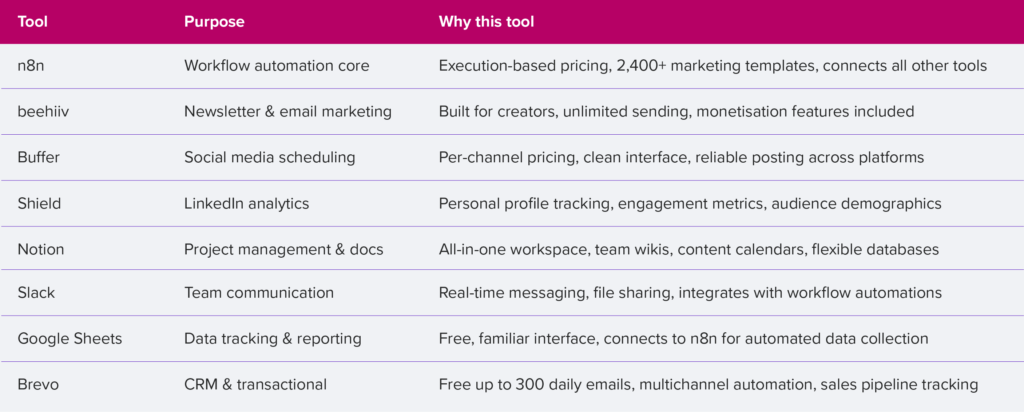
The stack works because n8n sits at the centre, connecting data flows between tools. Beehiiv handles newsletter campaigns with unlimited sending on paid plans, starting at €49 monthly for up to 2,500 subscribers. Buffer manages social distribution at €6-12 per channel monthly. Shield tracks LinkedIn performance starting at €25 monthly for personal profiles.
Notion organises everything from editorial calendars to campaign briefs. Slack keeps the team aligned with real-time updates triggered by workflow events. Google Sheets aggregates metrics from multiple sources through n8n connections (if you are tech-savvy enough, you can skip this and explore n8n native data tables). Brevo manages the sales pipeline alongside transactional emails, with a generous free tier for small teams.
Research from marketing automation specialists shows small teams using integrated stacks like this report 20-40% efficiency improvements compared to single-platform solutions. The modular approach means teams add or swap tools based on changing needs without disrupting the entire system.
Essential workflows that save time
Lead capture and enrichment
New leads from website forms trigger n8n workflows that enrich contact data through API lookups, score leads based on predefined criteria, and route qualified prospects to appropriate nurture sequences. The workflow pulls company data, validates email addresses, checks LinkedIn profiles, and assigns lead scores, all within seconds of form submission.
A B2B client automated this process to handle 300+ monthly leads, saving 10 hours of manual data entry and research. The automated scoring improved sales team efficiency by 35% because reps focused only on qualified leads above threshold scores.
Behaviour-based email sequences
Subscriber actions in beehiiv trigger conditional email paths. Content downloads, link clicks, or email opens determine which messages subscribers receive next. Someone who clicks pricing information gets different follow-up than someone who downloads a technical guide.
Research from Bit Flows shows behaviour-triggered emails achieve 25-40% higher open rates compared to generic campaigns. The improvement comes from relevance. Subscribers receive content that matches demonstrated interest rather than generic sequences everyone gets.
Social media distribution
Content scheduled in Google Sheets triggers n8n workflows that post directly to social platforms via APIs or through Buffer’s scheduling queue. The workflow reads the content calendar, formats posts according to platform requirements (character limits, hashtag placement), and schedules distribution.
This approach requires manual content planning in spreadsheets but automates the actual posting process. Marketing teams maintain editorial control while eliminating the repetitive task of logging into multiple platforms.
Analytics aggregation
LinkedIn metrics, beehiiv email performance, and Buffer engagement data combine into weekly reports automatically. n8n pulls data from each platform’s API, standardises formats, calculates key metrics, and populates Google Sheets databases.
The automated data collection replaces manual spreadsheet updates that previously consumed 3-4 hours weekly. Marketing teams see unified performance views without switching between five different analytics dashboards.
Customer onboarding sequences
New subscribers enter automated nurture sequences that deliver welcome content, educational resources, and product information over time. The sequences use conditional logic based on engagement. High-engagement subscribers receive accelerated sequences, while low-engagement subscribers get re-engagement content.
Marketing automation research indicates properly sequenced onboarding improves conversion rates by 15-30%. The improvement comes from consistent touchpoints that educate prospects without overwhelming them.
Time investment and ROI
Initial setup requires different time commitments per workflow type. Simple two-step automations like “new form submission → send Slack notification” take 30-60 minutes to build and test. Complex multi-tool workflows like lead enrichment pipelines need 3-5 hours of configuration and testing to handle edge cases properly.
For reference:
- The first workflow always takes the longest because teams are learning the platform
- The second workflow takes half the time.
- By the fifth workflow, most teams build new automations in under an hour because they understand the patterns.
Monthly maintenance averages 2-3 hours for monitoring execution logs, updating workflow logic based on changing requirements, and optimising poorly performing automations. Most teams report time savings of 15-20 hours weekly once core automations stabilise across lead management, content distribution, and reporting workflows.
The cost comparison favours this approach significantly. HubSpot Marketing Hub Professional starts at €800 monthly for basic marketing automation, workflows, and reporting. Marketo begins around €1,000 monthly before adding email sending costs and implementation fees.
This stack delivers comparable functionality for €100-200 monthly depending on subscriber counts and execution volumes, representing 80-90% cost savings compared to enterprise platforms.
When to use this approach vs enterprise tools
Team size and technical capability determine the right choice. Marketing teams under 10 people with at least one technically comfortable member suit this stack well. The workflow-building approach requires comfort with APIs, JSON data structures, and logic flows. Teams need someone who can troubleshoot failed executions and optimise workflow performance.
Enterprise platforms make sense for teams exceeding 50 people, those needing extensive customer support with guaranteed response times, or organisations requiring zero technical setup time. The premium pricing buys managed implementation, dedicated support teams, and enterprise-grade SLAs.
Budget constraints matter less than workflow complexity needs. Teams running sophisticated multi-channel campaigns with complex segmentation logic benefit more from flexible workflow automation than from enterprise platforms with rigid pre-built sequences.
Getting started: implementation roadmap
Start with one high-impact workflow rather than attempting to automate everything simultaneously. Lead capture and enrichment typically delivers the fastest ROI because it saves time on every new lead while improving lead quality. Here are 3 tips to help you on your automation journey:
1. Build the workflow in n8n cloud first, even if planning eventual self-hosting.
Cloud hosting removes infrastructure concerns during the learning phase. Teams can migrate to self-hosted deployments after validating workflows in production.
2. Test workflows thoroughly with sample data before connecting to live systems.
n8n’s manual execution mode lets teams step through workflows one node at a time, verifying data transformations at each stage.
3. Document workflows as they’re built.
Future team members need to understand automation logic without reverse-engineering complex workflows. Simple README files explaining workflow purpose, triggers, and dependencies prevent knowledge gaps.
Start with the automation core
Marketing automation doesn’t require enterprise budgets. Building workflows around n8n as the central automation engine, then connecting specialist tools for specific functions, delivers powerful marketing capabilities at startup-friendly pricing.
The key sits in selecting tools that integrate well and solve specific problems, rather than attempting to find one platform that does everything adequately. Start simple, automate one workflow at a time, and build towards comprehensive marketing automation without the enterprise price tag.