Sinas 0.4.0 adds pipelines (multi-step flows that connect APIs, functions, agents and databases), a single-container profile for small installs, and two per-agent dials for what you spend on models: effort and prompt caching. Bulk agent work can also go to the model provider’s own batch API at roughly half the token cost. This post explains what each one is for, how they fit together, and the trade-offs worth knowing before you switch anything on.
Why agents need pipelines
A pipeline is a multi-step flow you declare once, attach a trigger to, and let Sinas run, record and replay.
Most useful agent work runs as a flow rather than a conversation: pull records from an API, reshape them, have an agent enrich or classify each one, and write the results somewhere a person or another system can use them.
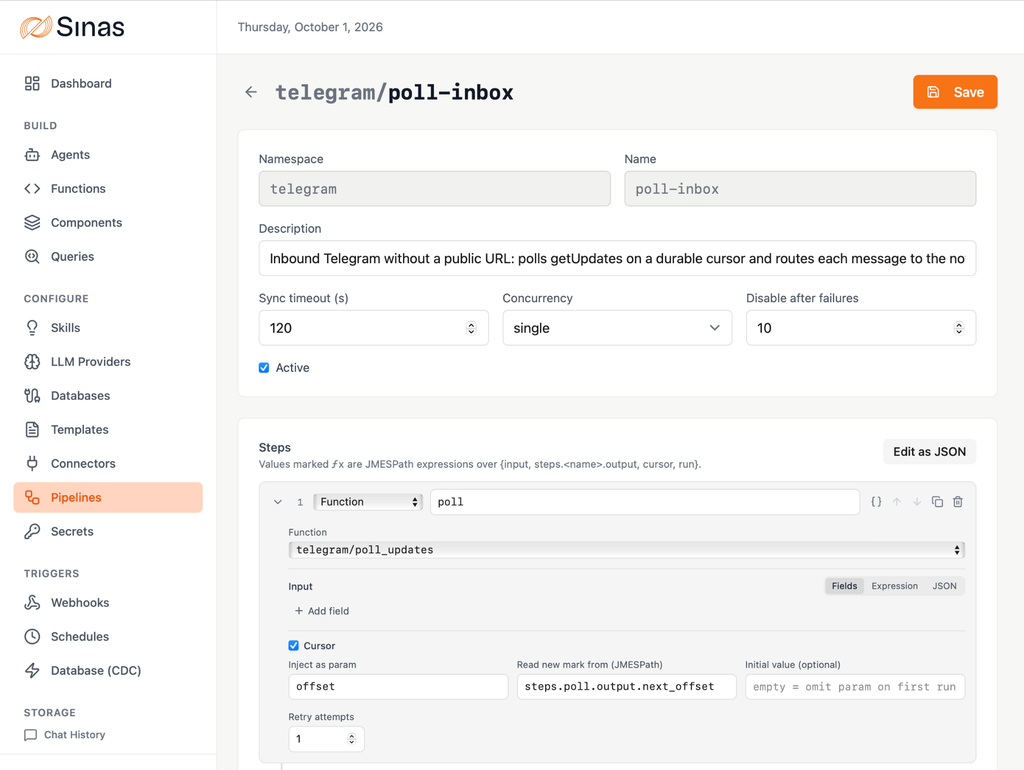
Before 0.4.0 you could build that in Sinas, but you built it as glue: a scheduled function calling an agent calling another function, with the flow logic living in code only its author understood. Pipelines make the flow itself a first-class object. You declare the steps (connector call, transform, function, agent, query, database load), pick a trigger (a schedule, a webhook, a database change, or an agent using the pipeline as a tool), and Sinas runs it, records every run, and lets you replay one when a step needs a second chance.
The console gets a visual steps editor for building and reading these flows. The value there is maintenance: the person who picks up the flow six months from now can see what it does without reading the source.
Run Sinas as a single container
Sinas can now run as one container: the API, background workers, scheduler, change capture and console together. At idle the whole install, including its database and cache, uses about 256 MiB of memory.
That makes Sinas practical in places it wasn’t before: a small virtual machine for a single team, a laptop for evaluation, or a separate instance per client where each one has to stay cheap. The lite profile caps how many agent and function runs execute at once, so it suits steady, modest workloads. The full deployment remains the choice for heavy or bursty traffic.
Two per-agent dials for the model bill
Both of these are per-agent settings because the right value depends on the workload, not on the provider.
Effort decides how much the model thinks. Recent Claude models such as Sonnet 5 and Opus 5 think before they answer by default, and that thinking is billed as output tokens. On these models the older thinking-budget setting is no longer accepted: effort is the control. Until now Sinas never set it, so every Claude agent thought at the model’s default, which is high on most current models. Each agent can now choose low, medium, high, extra high or max. Low suits routing, extraction and simple tool calls. Keep higher settings for research and multi-step agentic work, where the extra thinking pays for itself.
Prompt caching decides whether a large prompt is reused. Caching saves money when an agent reuses a large system prompt across many calls, and costs money when it doesn’t, because cache writes carry a premium. Until now the setting lived on the provider, so tuning it per workload meant registering the same provider twice with a copied API key. An agent can now inherit the provider’s setting or force caching on or off for itself.
Only behaviour settings can be overridden this way. Connection settings such as keys and endpoints stay on the provider, deliberately.
How batch mode halves the bill for bulk agent work
For agent workloads that don’t need an answer in seconds, 0.4.0 can submit the whole batch to the model provider’s own batch API, where Anthropic, OpenAI and Gemini all price tokens at roughly half the interactive rate. Classify ten thousand tickets, extract entities from a month of support mail, summarise a document archive: same transcripts, same usage tracking, same callbacks, about half the token cost, and results within a day rather than within seconds.
You opt in per submission:
POST /agents/support/ticket-classifier/chats/batch
{
“execution_mode”: “provider”,
“inputs”: [
{ “message”: “Classify this ticket: …” }
]
}
| Dimension | Queue mode (default) | Provider batch mode |
|---|---|---|
| Latency | seconds to minutes | minutes to 24 hours |
| Token cost | standard rate | about 50% of standard |
| Agent capabilities | full, including tools | agents without tools |
| Per-user context in prompts | applied | not applied |
| Transcripts and usage tracking | yes | yes |
| Best for | interactive and time-sensitive work | classification, extraction and summarisation at volume |
The tool limitation is real and structural: a provider batch is one model call per item, so there is no runtime to serve tool calls mid-flight. Tool-using agents stay on the queue path.
API keys that can’t outgrow their owner
An API key can now be linked to roles, and its permissions are always capped by what its owner holds right now. Revoke a permission from a person, and their keys lose it too. Previously a key kept whatever it was created with.
Packages can now ship roles of their own, so an integration can bring a least-privilege role with it. Packages define roles but never assign them: deciding who holds a role stays with an administrator.
How your own services can verify Sinas tokens
If you run services next to Sinas, they can now verify Sinas access tokens without calling Sinas. Switch token signing to RS256 and Sinas publishes its keys in standard JWKS form, adds standard issuer and audience claims, and serves an OIDC-style userinfo endpoint that exposes a user’s roles and custom fields as plain claims. Any JWT middleware in any language can then authenticate Sinas users offline. The default signing mode is unchanged; this is opt-in.
What else is in 0.4.0
- Current Claude models (5.5+). Agents with an output schema now use Claude’s native structured outputs, which work on every current Claude model, including the newest. Parallel tool calls on OpenAI-style providers no longer break the conversation.
- Gemini has a provider type of its own, which batch mode needs and which fixes multi-step tool calling.
- Your own services can verify Sinas tokens offline. Switch token signing to RS256 and Sinas publishes its keys as a standard JSON Web Key Set, with issuer and audience claims and a userinfo endpoint. Any JWT middleware can then authenticate Sinas users without calling Sinas. This is opt-in.
- Light mode for the console, toggled from the login screen and remembered per browser.
- Webhooks can target agents directly, with an optional raw response.
- Connector OAuth handles providers that bend the rules, such as Slack nesting user tokens or reporting errors on successful responses, as configuration rather than workarounds.
- Bulk ingestion is sturdier. If thousands of uploads each trigger a processing function, the work now queues and drains at the available capacity instead of failing when the pool is momentarily full.
Worth knowing
Batch mode trades latency for cost, and the ceiling is the provider’s: up to 24 hours, usually much less, but not guaranteed. Effort is not accepted by every model: Claude Haiku 4.5 rejects it, so leave it unset there. Turning caching off for an agent that reuses big prompts will raise its cost; the override cuts both ways. After switching token signing to RS256, the console refreshes its session transparently, but other clients holding access tokens will need to refresh theirs.
Not everything in 0.4.0 is opt-in. API keys are now capped by their owner’s current permissions, so a key that holds more than its owner does today loses the difference on upgrade: review your service keys first. The console has also moved to /ui. The release notes list every change and what to do about it.
Key takeaways
- Pipelines turn multi-step agent workflows into declared, triggerable, replayable objects instead of glue code.
- Sinas can run as a single container, idling at about 256 MiB including its database and cache.
- Effort and prompt caching are per-agent settings, so model cost is tuned per workload rather than per provider.
- Provider batch mode runs tool-less agent workloads at roughly half the token cost, in exchange for latency.
- API keys are now capped by their owner’s live permissions, so review service keys before upgrading.
Documentation: docs.sinas.co · Source: github.com/sinas-platform/sinas