Sinas 0.3.0 is out. Three new features and a batch of smaller improvements: OAuth 2.0 on connectors, user identity and custom fields available in agent, function and query context, and support for deploying Sinas on Kubernetes with a Helm chart.
Here is what each one does, and when you would reach for it.
What changed in 0.3.0
| What shipped | What it replaces | Where it applies |
| OAuth 2.0 on connectors | A scheduled function refreshing a secret to keep personal authentication alive | Client credentials and authorization code grants |
| External identities, custom fields, token exchange | Per-user attributes held outside Sinas and passed in by hand | Agent runs, functions and queries |
| Kubernetes deployment with a Helm chart | Docker Compose as the only deployment option | Managed clusters or your own |
| Per-call token tracking and prompt caching | Your provider’s dashboard, your own metering, or an LLM gateway | Usage tile on the dashboard |
Connectors that speak OAuth
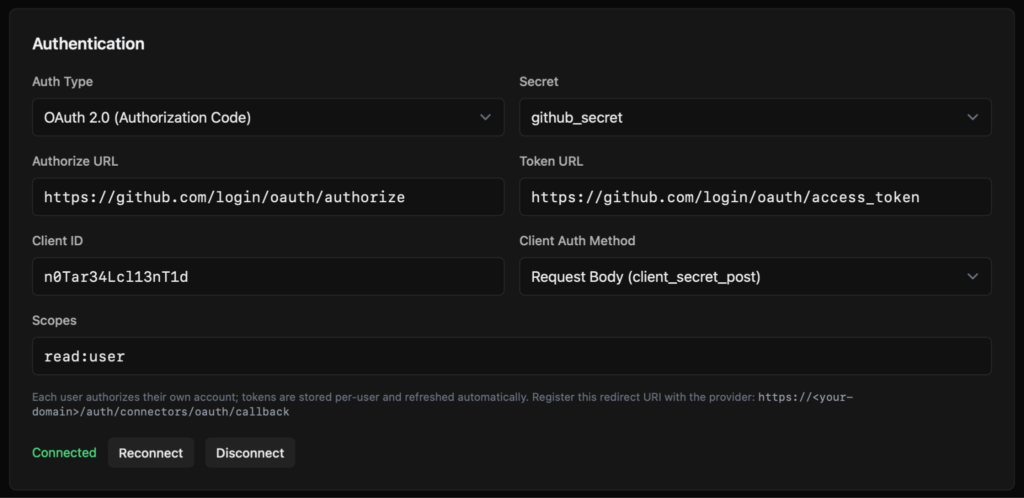
Connectors are how Sinas agents reach the outside world: Slack, GitHub, Google, your internal APIs. Connectors already handled the common authentication methods, so reaching authenticated services is not new. Personal authentication was the awkward part. Setting up an OAuth flow manually was possible, but it meant scheduling a function to refresh a secret on a timer and keeping an eye on it.
0.3.0 makes that a first-class path, in both grant types.
| Client credentials | Authorization code | |
| What it is for | Service to service calls where the agent acts as itself | Calls made on behalf of a named person |
| Setup | Point a connector at a token endpoint, add a client ID and secret | The user clicks connect and approves once |
| What Sinas stores | The client credential | Access and refresh tokens, encrypted per user |
| Token handling | Fetched, cached and refreshed automatically | Refreshed automatically on expiry |
| Protection | Secret kept out of the agent runtime | PKCE on the code exchange |
The per-user path is the one that changes day to day work. Your user clicks connect, approves once, and the agent can call that API on their behalf from then on. Tokens are stored encrypted per user and refreshed when they expire, with no scheduled job in the middle.
Import an OpenAPI spec and Sinas reads its security schemes and pre-fills the auth configuration for you. What used to be a hunt through token documentation is now a few fields and a connect button.
Agents that know who they are working for
Sinas has had users and permissions from the start, so agents were never operating anonymously. What 0.3.0 adds is richer context about who the caller is, and the ability to use it inside the work an agent does.
- External identities. Link a Sinas user to the accounts they already have in your identity provider, so “this user” resolves to the same person everywhere.
- Custom fields. Attach the attributes that matter to you, such as role, team, plan or locale, and read them inside agent runs, functions and queries. Personalisation becomes part of the context rather than something you pass in by hand.
- Token exchange. Bridge your existing authentication into Sinas without rebuilding it, so external systems can hand off identity cleanly.
Together they turn “a user” into your user, and let agents behave accordingly.
Running Sinas on Kubernetes
Sinas has run as a Docker Compose stack since the beginning. That stays true: it is production ready, it is the fastest way to get started, and nothing in this release changes it. What 0.3.0 adds is a second option for teams who already run Kubernetes and would rather have Sinas alongside the rest of their platform.
The release ships a Helm chart for the whole stack and an execution model built from native Kubernetes primitives. Every piece of untrusted code runs in its own ephemeral, hardened Pod, created on demand, isolated by NetworkPolicy and torn down the moment it is done. Those Pods follow the restricted profile in Pod Security Standards, and Sinas manages them through the Kubernetes API with narrowly scoped RBAC.
It installs cleanly on EKS, GKE or your own cluster, and your platform team can review it with the same tooling they use for everything else.
If you want a leaner footprint instead, the same release adds a compact profile with fewer moving parts, so a full Sinas runs comfortably on modest hardware. Same platform, your choice of footprint.
Smaller improvements
0.3.0 adds per-call LLM token tracking with a usage tile on the dashboard, plus Anthropic prompt caching. Seeing what your models cost previously meant consulting your provider’s dashboard, building your own metering, or routing all LLM traffic through a gateway. Now it is in the same place as everything else.
The release also brings smarter handling of large tool results and a batch of reliability improvements across agents and connectors.
Upgrading
Existing deployments keep working as-is. The new executor modes are opt in, and a few authentication behaviours have changed, so read the release notes before you upgrade.
- Docker: IMAGE_TAG=0.3.0 docker compose up -d
- Kubernetes: helm install sinas oci://ghcr.io/sinas-platform/charts/sinas –version 0.3.0
- Full release notes and upgrade guide: https://github.com/sinas-platform/sinas/releases/tag/0.3.0
The documentation covers configuration in detail, and the code is open source if you would rather read the implementation than the description.